
PODCAST CLIPPING GUIDE
Podcast clipping: turn long episodes into clips people finish
An hour-long episode holds a few moments that work on their own. Finding them is the job. This guide covers which moments to pick, how to cut them, what campaigns ask for, and a fast way to go from episode to captioned clip.
Works in mobile and desktop browsers. Free plan, no credit card.
Six kinds of moment that work
A good podcast clip makes sense to someone who has never heard the show. Look for these while you listen:
A strong claim
A guest says something specific and arguable, for example: “Most startups die from indigestion, not starvation.” The first line carries the clip.
A story with a payoff
A short story whose ending lands inside the clip. Cut the setup hard; keep the turn and the ending.
A specific number
For example: “We went from 40 to 4,000 customers in a year.” Numbers make an abstract point concrete and quotable.
A practical answer
A clear question followed by a usable answer. Keep enough of the question for a stranger to follow.
Disagreement
Two people who do not agree, both making a good point. Keep both sides so the clip stays fair.
A real reaction
Laughter, surprise or an honest pause. Reactions travel well, but only if the viewer knows what caused them.
How to cut a podcast clip
- Start on the strongest line. Cut “so, um, I think” and begin where the point begins. The first two seconds decide whether people stay.
- Keep one idea. If the guest moves to a second point, end before it. Make a second clip instead.
- Keep the context a stranger needs. For an answer, keep the question or add it as on-screen text.
- End on the payoff. Cut right after the last strong word, not after the laugh that follows it.
- Caption every word. Many people watch without sound. Check names and technical terms before you post.
- Name the source. Put the show or guest in the title or caption, and tag them when the campaign asks.
What podcast clipping campaigns ask for
Podcasts and brands pay clippers per view through marketplaces such as Clipster and Whop Content Rewards, or hire them directly. Briefs usually ask for:
- Footage only from the show’s folder or channel, often a Google Drive link.
- On-screen captions, and a caption that matches the clip.
- Tags for the show and its hosts in every post.
- A minimum length, often 7–10 seconds, and sometimes a 60-second maximum.
- An account that fits the niche, with public stats, and posts kept up after the campaign.
LIVE EXAMPLE · SEPTEMBER 25, 2026
De-Influenced [Podcast clipping] on Clipster
$2,000 per 1M views on Instagram. Clips earn from 2,000 views, must run at least 10 seconds, and stop paying at $400 per post (200,000 views). The campaign supplies the footage. Its rules ask for on-screen captions or your own text. Read the full brief before you post.
See every live campaign’s rate, minimums and caps in our Clipster campaign guide, and estimate earnings with the clipping calculator.
From episode to clip with FastClip
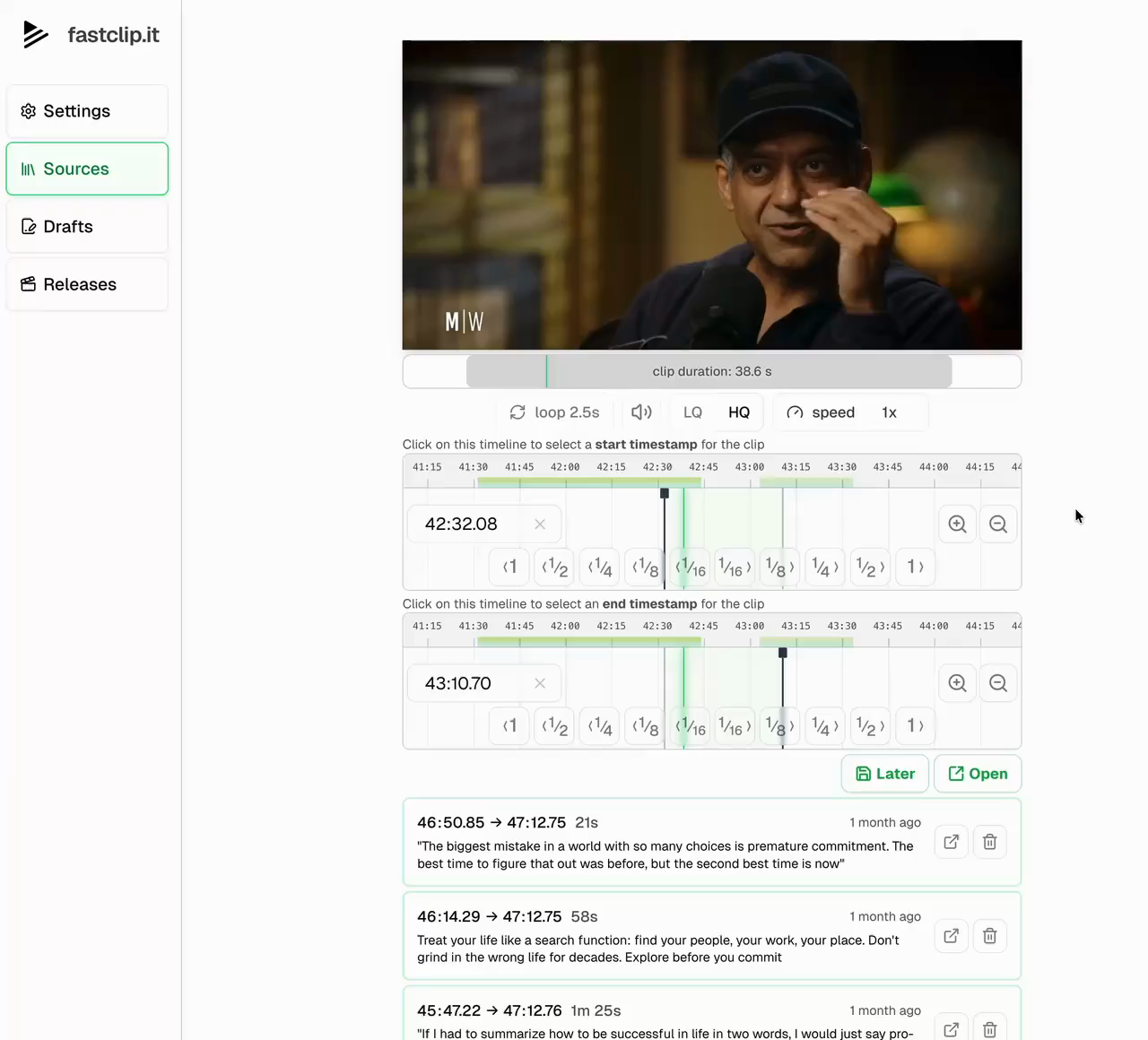
1. Import the episode
Paste the episode’s YouTube link, or upload the video file from the campaign’s folder (up to 5 GB). The episode stays in your library for more clips.
2. Find the moment in the transcript
For YouTube episodes, read the transcript and select the exact words to keep, from the first strong line to the payoff. For uploads, set the start and end on the timeline.
3. Caption and frame it
FastClip transcribes the clip and burns in word-timed captions. The vertical export places the episode in a 9:16 frame with your title above, a common format for podcast clips.
4. Post it
Publish to Instagram Reels or X from FastClip, or download the MP4 for TikTok and YouTube Shorts. Then submit the post link to the campaign.
Good to know
- FastClip does not yet crop to full-screen 9:16, track faces, or add watermark files. Use a second editor when a brief needs them.
- It imports YouTube and X links and uploaded files, not Spotify, Apple Podcasts, Drive or Twitch links.
- The free plan includes 3 YouTube or upload imports and 5 finished clips in total, at most 2 a day. Email us if you clip at volume.
Podcast clipping questions
What is podcast clipping?
Podcast clipping is cutting short, self-contained moments from long podcast episodes and posting them as vertical videos on TikTok, Instagram Reels, YouTube Shorts or X. Podcasters do it to grow their show; clippers do it for podcasts and brands that pay per view through clipping campaigns.
How much do podcast clippers make?
It depends on the campaign and your views. For example, the De-Influenced [Podcast clipping] campaign on Clipster paid $2,000 per 1M views on September 25, 2026, with a 2,000-view minimum and a $400 cap per post. Use the clipping calculator to test your own numbers.
How long should a podcast clip be?
Long enough for one complete thought, and no longer. Many campaigns set a minimum of 7–10 seconds and some a maximum of 60 seconds. Most strong podcast clips land between 20 and 60 seconds.
Do I need permission to clip a podcast?
Yes. A public episode does not give you the right to republish it. Clip shows you own, shows that hired you, or campaigns that grant permission and supply the footage.
Can I clip a podcast from Spotify or Apple Podcasts?
FastClip imports YouTube and X links and uploaded video files. Many podcasts publish full video episodes on YouTube; use that link, or upload the file the campaign or show gives you.
What is the best podcast clipping tool?
Choose by the job. Tools that pick clips for you, such as OpusClip, suit volume when you trust their choices. FastClip suits clippers who want to choose the exact words themselves: select them in the transcript, burn in captions and post. Many clippers also keep a general editor, such as CapCut, for watermarks and effects.
Clip your next episode
Bring one episode link and make one clip. Podcasters clipping their own show can start from the podcast clip maker page.
Start clipping for free