
Best Podcast Clip Maker in 2026: the buyer's shortlist
By Anatolii Zhukovskyi, Founder of FastClip
The best podcast clip maker in 2026, on our seven scored criteria, is Headliner: it takes a YouTube link, a video or an audio file, finds clips by itself, lets you set exact cuts, captions in more than 100 languages and posts to seven networks, from $7.99 a month. Vizard is second, for a ranked batch of clips from a long upload. FastClip, which we make, is third: the best podcast clip maker for one exact moment, free, with no watermark and no ads. Riverside, OpusClip, Descript and Castmagic follow.
Disclosure: FastClip publishes this page, and FastClip is one of the products ranked. We rank by the criteria below, say plainly where other tools are better, and cite the source of every fact with the date we checked it. No company paid to be listed, and we earn nothing from the links.
New to clipping a show? The podcast clipping guide covers what a good clip needs and what clipping campaigns pay, and the free YouTube Most Replayed tool shows which minutes of an episode viewers already rewatch.
Key Takeaways
- Headliner scores highest (13/14). It is the only tool here with full points on all four of ways in, automatic clips, caption languages and posting. Its own pages disagree about watermarks on free exports, so make a test export before you rely on the free plan.
- Vizard is second (11/14), and with OpusClip the pick for many automatic clips per episode. Both find and rank a batch of clips in a long upload, from $14.50 a month billed yearly, and Vizard also takes audio files. Both watermark free exports and count credits per minute of source video, not per clip you keep.
- FastClip is third (10/14) and the best pick for one exact moment. You set the cut by typed times, the timeline or transcript words, and the free plan has 100 finished clips in total with no watermark. It does not cut a batch of clips for you, and YouTube now refuses most downloads from its servers, so upload the episode file.
- If you record the show yourself, Riverside or Descript fit better. Riverside records the episode and makes Magic Clips from it; Descript edits video by editing the transcript. Neither imports a YouTube link, so you work from your own file.
- Most free plans watermark, expire or show ads. Riverside, Descript, OpusClip and Vizard watermark free exports, free OpusClip clips can no longer be exported after 3 days and free Vizard projects are deleted after 3 days, Headliner's free plan shows ads, and Castmagic has no free plan. FastClip's free plan has no watermark and no ads, but its 100 finished clips are a total, not a monthly allowance.
Try it on one episode
Paste a link here, or upload the episode file in the app. Start from a suggested moment and set the exact start and end. Free, no credit card, no watermark.
What a podcast clip maker actually is (and what it is not)
A podcast clip maker turns one moment of a long episode into a short video that makes sense on its own: usually 15 seconds to 3 minutes, often vertical 9:16 for YouTube Shorts, TikTok and Instagram Reels, with captions burned in because many people watch without sound. The job has four steps: bring the episode in, find the moment, cut it at the right words, then frame and caption it.
Tools differ most in the second and third steps. Automatic clippers such as OpusClip, Vizard and Headliner's AI clips read the transcript and return a ranked batch; you review it and delete what does not work. Manual-first tools such as FastClip and Castmagic suggest moments and let you choose the exact words. A batch saves time when you need ten clips an episode; a manual cut saves rework when one clip must start on a full sentence and end on the point.
What it is not: it is not a full video editor (for music, B-roll and multi-track timelines, use an editor such as Premiere Pro, DaVinci Resolve or CapCut), it is not a recording studio (Riverside is both), and it gives you no rights to other people's shows. Clip episodes you own or shows that invite clipping. If your show is audio only, several tools here make audiograms; see the audiogram maker.
See FastClip make one clip
How We Ranked These Podcast Clip Makers
We scored each tool from 0 to 2 on seven criteria that you can check before you pay. Every score comes from the vendor's own pricing and help pages, read on the dates listed under Sources. Where a vendor's pages contradict each other, we used the less generous statement. The highest total ranks first.
- Exact cut. 2 if you can make a new clip from any start and end you choose (typed times, timeline handles or selected transcript words); 1 if you can only adjust clips the AI made or the range it scans; 0 if neither.
- Free plan. 2 if the free plan gives at least 10 watermark-free clips a month or 100 in total; 1 if free exports exist but carry a watermark, are limited to one watermark-free export a month, or are a one-off trial; 0 if you cannot export for free.
- Lowest price. The cheapest paid plan per month, yearly billing allowed: 2 for $0 or under $10, 1 for $10 to $20, 0 for more than $20.
- Ways in. Three ways to bring an episode in: a YouTube link, a video file and an audio-only file. 2 for all three, 1 for two, 0 for one. We take each vendor at its word, except FastClip, whose own records show most YouTube imports refused today.
- Automatic clips. 2 if the tool finds and returns a batch of clips by itself; 1 if it suggests a few moments for you to cut; 0 if neither.
- Caption languages. The number of transcription languages the vendor publishes: 2 for 50 or more, 1 for 20 to 49, 0 for fewer or none published.
- Direct posting. 2 if the tool posts to four or more social networks on some plan, 1 for one to three, 0 for none.
| Tool | Cut | Free | Price | Inputs | AI clips | Languages | Posting | Total |
|---|---|---|---|---|---|---|---|---|
| Headliner | 2 | 1 | 2 | 2 | 2 | 2 | 2 | 13/14 |
| Vizard | 2 | 1 | 1 | 2 | 2 | 1 | 2 | 11/14 |
| FastClip | 2 | 2 | 2 | 1 | 1 | 1 | 1 | 10/14 |
| Riverside | 2 | 1 | 0 | 1 | 2 | 2 | 2 | 10/14 |
| OpusClip | 1 | 1 | 1 | 1 | 2 | 1 | 2 | 9/14 |
| Descript | 2 | 1 | 1 | 1 | 2 | 1 | 1 | 9/14 |
| Castmagic | 2 | 1 | 1 | 2 | 1 | 2 | 0 | 9/14 |
Ties are broken by the free-plan score, then by the lower price. FastClip and Riverside both score 10, and FastClip ranks first of the two on its free plan. OpusClip, Descript and Castmagic all score 9 and are ordered by price.
How we checked. We read each vendor's pricing page, help center and, where they exist, its Trustpilot and App Store pages, without signing up for anything. We tested FastClip itself: its numbers come from its code and from its production records for the 30 days to October 14, 2026. G2 and Capterra blocked our requests, so we left their ratings out instead of copying numbers we could not open. We scored FastClip one point lower on ways in, because YouTube has refused most downloads from FastClip's servers since October 7, 2026.
The Best Podcast Clip Makers in 2026
Ranked by total score. Each entry says what the tool is best for, what it costs, where it falls short and who should pick it.
- 1.Headliner, best for AI clips, audiograms and auto-posting in one place
- 2.Vizard, best for a batch of automatic clips with an editor on the free plan
- 3.FastClip, best for one exact moment, free, with no watermark and no ads
- 4.Riverside, best if you record the podcast on Riverside
- 5.OpusClip, best for automatic clips at volume with a virality score
- 6.Descript, best for editing clips by editing the transcript
- 7.Castmagic, best for clips plus show notes and posts from one transcript
1.Headliner, best for AI clips, audiograms and auto-posting in one place
Headliner began as an audiogram maker and now clips video too. It comes from Sparemin, a New York company co-founded by Neil Mody; Headliner itself launched in 2018. It takes a YouTube link, a video or audio file, or your podcast's RSS feed. Its AI finds up to 10 clips per upload and can start from YouTube's Most Replayed data, and you can type exact start and end times or highlight transcript text to make your own clip. It transcribes and captions in more than 100 languages and posts to YouTube, Instagram, TikTok, LinkedIn, Facebook, X and Threads.
Basic costs $9.99 a month, or $7.99 a month billed yearly: 10 watermark-free audiograms a month, 1080p video up to 10 minutes long, automations for several podcasts and auto-posting. The free plan is ad-supported. Headliner's pricing page says its video clipping and captioning tools are free on any account while they are in beta; its help center says a watermark appears after a free user's first export each month. We scored the free plan on the stricter statement.
Limits: the editor exports at most 10 minutes, and Basic captions at most 10 minutes per project. The iPhone app has 4.84 out of 5 from 4,972 ratings on the US App Store. Headliner says 1.5 million podcasters use it, which is its own claim.
Best suited for: Podcasters who publish every week and want clips, audiograms and posts made from the RSS feed with little manual work. Make a test export first if you plan to stay on the free plan.
2.Vizard, best for a batch of automatic clips with an editor on the free plan
Vizard turns long videos into short clips for TikTok, Instagram, YouTube Shorts and other channels. It imports links from YouTube, Loom, Google Drive, Vimeo, Dropbox and more, or an uploaded video or audio file (MP3, WAV or M4A), and its AI returns a ranked batch; Vizard says it can make up to 40 clips from a one-hour video, which is its own claim. Unlike most automatic clippers, it also lets you make a clip by hand by selecting text in the transcript.
The free plan gives 60 credits a month, one credit per minute of uploaded video, with the full editor. Free exports carry a watermark and are capped at 720p and 10 minutes, free projects are deleted after 3 days, and free uploads are limited to 60 minutes and 1 GB. Creator costs $29 a month or $14.50 a month billed yearly; it removes the watermark and adds 4K export and scheduled posts to TikTok, YouTube, LinkedIn, X, Instagram and Facebook Pages.
Vizard's help center lists 40 transcription languages. It has 4.7 out of 5 from 2,521 reviews on Trustpilot and 4.8 from 773 ratings for its iPhone app. The cost catch: credits count source minutes, so a two-hour episode uses 120 credits even if you keep only one clip.
Best suited for: Social teams that want many clips from each long episode and will review the AI's picks. Budget for Creator if the watermark or the 720p limit matters.
3.FastClip, best for one exact moment, free, with no watermark and no ads
FastClip is our product, so weigh this entry with that in mind. It is made for the person who already knows the moment. Upload the episode or paste a link, start from a suggested moment (the parts viewers replay most on YouTube, AI picks from the transcript, or the loudest parts), and set the exact start and end by typing times, dragging on the timeline or selecting words in the transcript. It burns in word-timed captions that you can correct word by word, removes ums and long pauses only if you ask, and crops to full-screen 9:16 that can follow the speaker's face.
The free plan has 100 finished clips and 50 YouTube or upload imports in total, at most 30 finished clips a day, no watermark, no ads and no credit card; there is no paid plan to buy. Clips are up to five minutes long and export as MP4 up to 1080p. An audio-only episode becomes a vertical video with a waveform and captions. Captions follow the spoken language, which is detected automatically among 35 languages; the app itself is in 8 languages. It posts directly to Instagram Reels and X, one post each on the free plan; for TikTok and YouTube Shorts you download the file. The Instagram version adds a small "Made with fastclips.app" line by default, which you can turn off in the publishing settings; the downloaded MP4 has none.
Where it falls short: it does not cut a batch of clips for you and gives no virality score. Since October 7, 2026, YouTube has refused most downloads from FastClip's servers, so a pasted YouTube link may wait in a queue; uploading the episode file works. It has no Trustpilot reviews yet, and no App Store ratings, because the iPhone app is still in public TestFlight beta.
Best suited for: Podcast hosts, producers and clippers who pick one moment at a time and need it to start on a full sentence. Not for a team that wants ten automatic clips from every episode.
FastClip, as it looks today
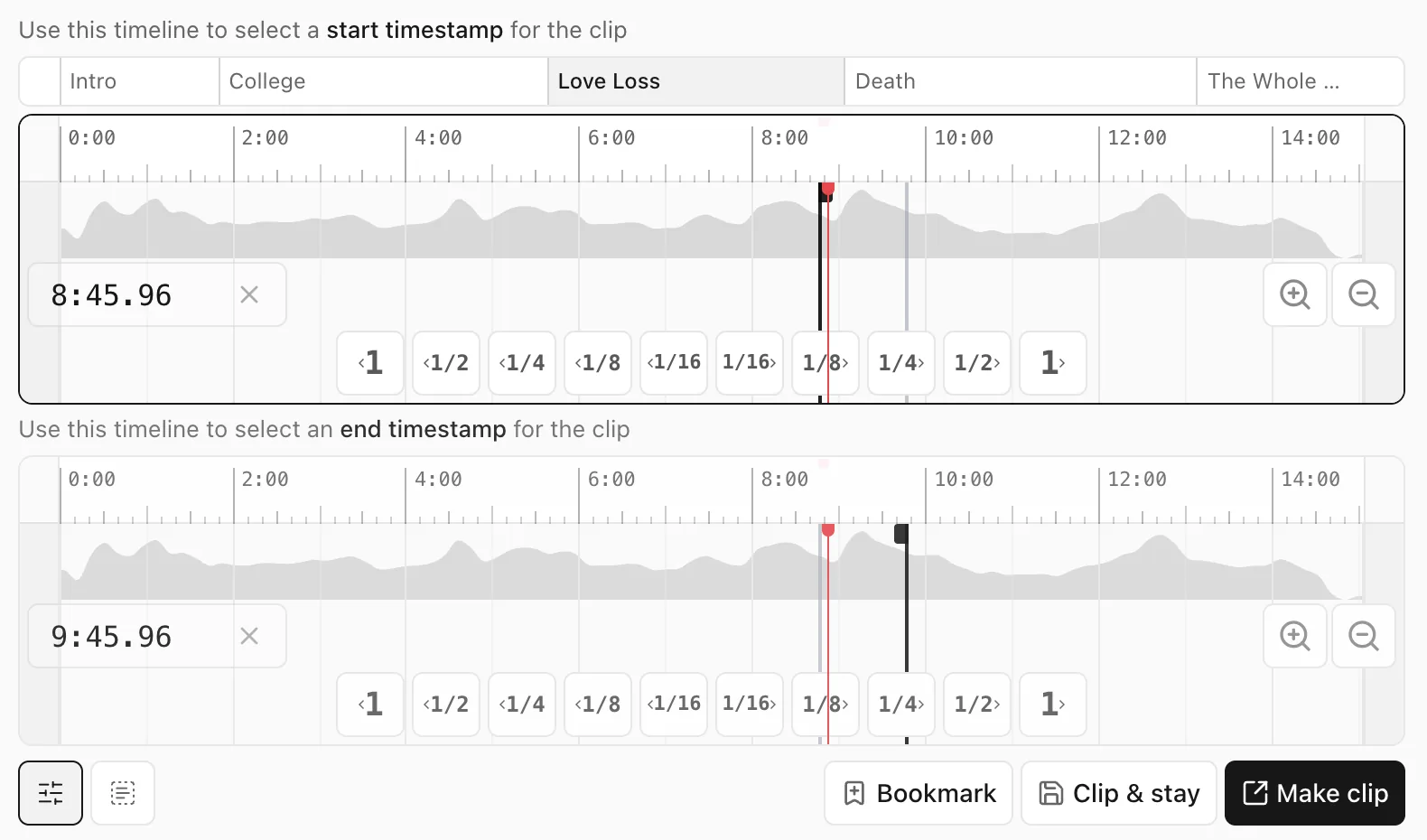
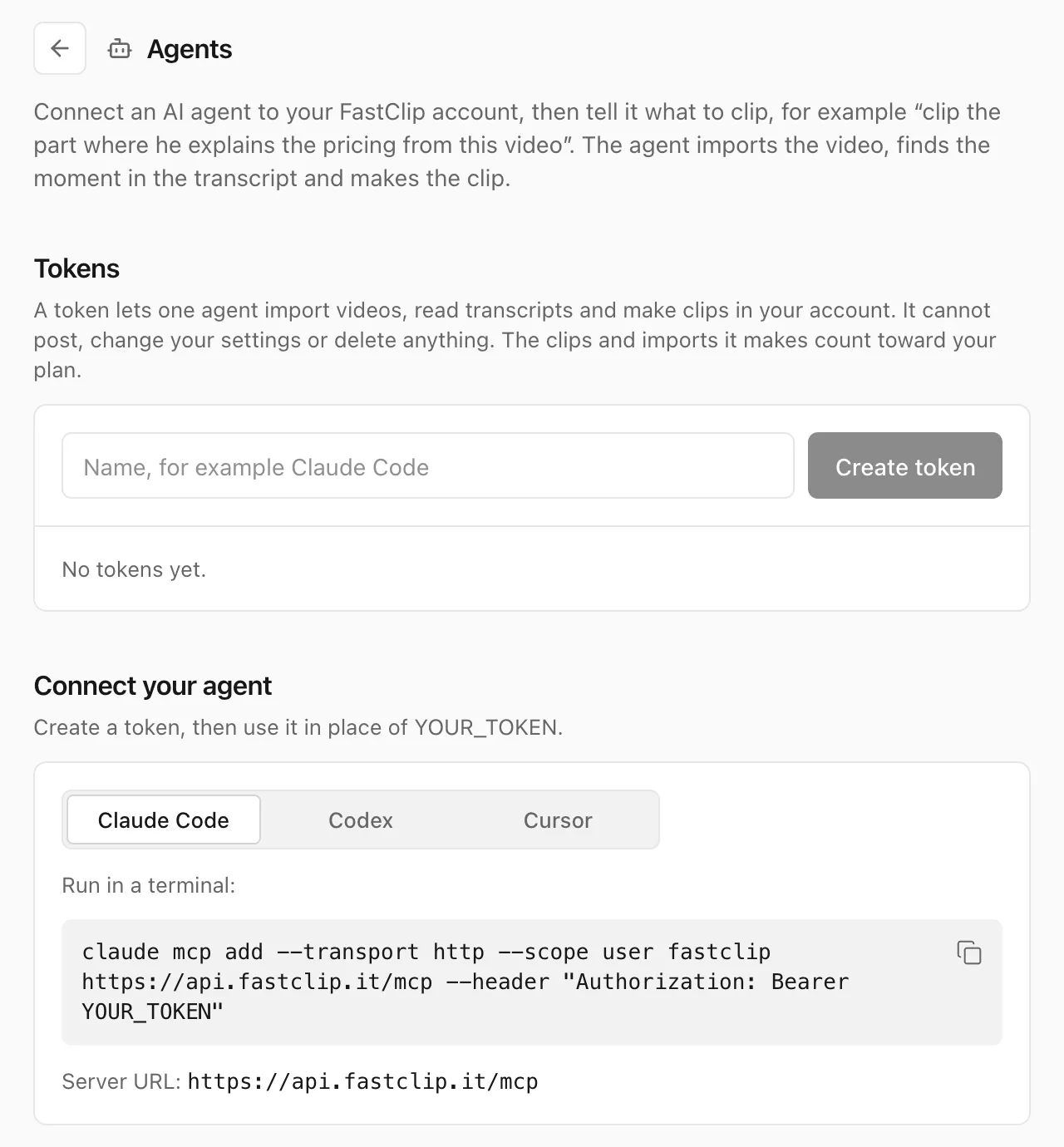
Screenshots of the FastClip web app, October 14, 2026.
4.Riverside, best if you record the podcast on Riverside
Riverside is a recording studio first: remote multi-track recording up to 4K, a text-based editor, hosting and publishing. Its Magic Clips feature, on every plan, makes short clips from a recording or an uploaded file; Riverside says it usually finds about 2 clips per 5 minutes, each 30 to 90 seconds long. You can widen a clip by restoring transcript text, drag trim handles, or highlight transcript text to make a new edit. It transcribes 97 languages.
The free plan includes 2 hours of separate-track recording once, unlimited single-track recording and editing, and one automatic set of Magic Clips per recording, with a Riverside watermark and 720p exports. Pro costs $29 a month or $24 a month billed yearly: up to 4K, no watermark, and publishing to YouTube, Spotify, Apple Podcasts, Instagram and LinkedIn. Social scheduling needs the Grow plan.
Riverside does not import YouTube links; its help center says you need the file. Uploads can be up to 4 hours and 25 GB each, with a 15-hour monthly upload limit on paid plans below Business. Ratings: 4.74 out of 5 from 20,137 App Store ratings and 3.8 from 522 Trustpilot reviews. Nadav and Gideon Keyson founded it in 2020.
Best suited for: Shows that record remote interviews and want recording, editing and clips in one tool. Less useful when the episode you want to clip exists only as a YouTube link.
5.OpusClip, best for automatic clips at volume with a virality score
OpusClip is one of the best-known AI clippers. It turns long videos into shorts, ranks them with a Virality Score on paid plans and posts to nine networks, including YouTube, Instagram Reels, TikTok, LinkedIn and X. It imports YouTube and many other links, or files up to 10 GB and 10 hours long. OpusClip says more than 20 million creators and businesses use it and that 440 million clips have been made, which are its own claims. Young Zhao, Jay Wu and Grace Wang founded it in 2022; it is based in Mountain View, California.
The free plan has 60 credits a month, one credit per minute of imported video, with a watermark, no editor, 9:16 only, and clips that can no longer be exported after 3 days. Starter costs $15 a month, billed monthly only, with 150 credits; Pro costs $29 a month, or $14.50 a month billed yearly. You can choose the part of the video the AI scans and, on paid plans, drag the edges of a clip, but its help center describes no way to make a new clip from typed times or selected words.
Captions cover 25 languages, 20 of them in beta. OpusClip's help center says YouTube link imports fail more often since YouTube changed its download rules, and suggests uploading the file. Ratings: 4.0 out of 5 from 510 Trustpilot reviews and 4.85 from 7,947 App Store ratings.
Best suited for: Creators and agencies who want many ranked clips from each episode and will pay to remove the watermark. Expect to review every pick before you post it.
6.Descript, best for editing clips by editing the transcript
Descript is a video editor in which you edit video by editing its text, with an AI co-editor called Underlord. Its Create Clips tool makes 1 to 20 clips of 10 seconds to 5 minutes, and you can make your own clip by selecting transcript text. Captions, layouts, aspect ratios and B-roll are in the same editor, and it exports timelines for Premiere Pro and Final Cut. It transcribes 26 languages, all written in the Latin alphabet, and publishes to YouTube and many podcast hosts.
The free plan gives 60 media minutes a month and 100 AI credits once, with watermarked 720p exports and files up to 1 GB. Hobbyist costs $24 a month or $16 a month billed yearly: 10 media hours a month, watermark-free 1080p exports and files up to 10 GB. AI credits are spent per action, even by chat messages, and do not roll over.
Descript turned off YouTube link import, so you upload a file, and it has no mobile app. Trustpilot shows 2.6 out of 5 from 290 reviews. Andrew Mason founded it in 2017. In a case study, Descript says LinkedIn's producers make 10 or more clips per interview by highlighting transcript text and save about an hour per project, which is Descript's claim.
Best suited for: Producers who already edit the full episode and want the clips from the same project. More tool than you need for one captioned clip.
7.Castmagic, best for clips plus show notes and posts from one transcript
Castmagic turns recordings into written content first: transcripts, show notes, newsletters and posts, plus captioned vertical clips and audiograms in its Studio. It imports YouTube, Spotify and Apple Podcasts links, RSS feeds with the whole back catalog, and files up to 10 GB. Its AI flags moments, but nothing renders until you pick one, and you can highlight any part of the transcript; clip edges snap to the start and end of sentences. It transcribes more than 60 languages.
Castmagic has no free plan, only a trial "to play with a few episodes" with no published allowance, which we scored as a one-off trial. Hobby costs $29 a month or $19 a month billed yearly, with 30 transcribed hours as a library total, unlimited clipping and audiograms and, by Castmagic's own statement, no watermark on any plan.
It documents no direct posting to social networks: you export the files or use Zapier. It does not publish its video export resolution, and its own pages give different user counts. Castmagic's about page lists Blaine and Ramon among its co-founders; their LinkedIn links name them as Blaine Bolus and Ramon Berrios.
Best suited for: Teams that need written content and clips from every episode and will pay from the first day. Not the tool to try for free.
Side-by-Side Comparison
The same seven tools, by the facts that decide most purchases. Prices are per month in US dollars.
| Tool | Score | Free plan | Lowest price | Exact cut | Automatic clips | Ways in | Works with AI agents (MCP) |
|---|---|---|---|---|---|---|---|
| Headliner | 13/14 | Ad-supported; video clips free during a beta; watermark after the first export a month (help center) | $7.99 billed yearly, $9.99 monthly | Yes: typed times or transcript | Yes, up to 10 per upload | YouTube link, video, audio, RSS feed | Not found on its pages |
| Vizard | 11/14 | 60 minutes a month, watermark, 720p, projects kept 3 days | $14.50 billed yearly, $29 monthly | Yes: transcript selection | Yes, ranked batch | YouTube and other links, video and audio files | Not found on its pages |
| FastClip | 10/14 | 100 finished clips in total, no watermark, no ads | $0: nothing to buy | Yes: typed times, timeline or transcript words | Suggests a few moments for you to cut | Video and audio files, Google Drive; YouTube links often refused today | Yes: sign-in (OAuth) or personal token; the agent cuts the exact start and end it chooses |
| Riverside | 10/14 | 2 recording hours once, watermark, 720p | $24 billed yearly, $29 monthly | Yes: transcript or trim handles | Yes, Magic Clips | Recording, video and audio files; no links | Yes: sign-in (OAuth); paid plan |
| OpusClip | 9/14 | 60 minutes a month, watermark, no editor, export within 3 days | Pro $14.50 billed yearly; Starter $15, monthly only | Partly: scan range and clip edges | Yes, ranked batch with score | YouTube and other links, video files | Yes: sign-in (OAuth); the AI picks the clips; paid plan |
| Descript | 9/14 | 60 minutes a month, watermark, 720p | $16 billed yearly, $24 monthly | Yes: transcript selection | Yes, 1 to 20 clips | Video and audio files; no links | Yes: sign-in (OAuth) |
| Castmagic | 9/14 | Trial only, terms not published | $19 billed yearly, $29 monthly | Yes: transcript, snapped to sentences | Flags moments for you | YouTube and podcast links, RSS, files | Yes: sign-in (OAuth); reads transcripts and content, makes no clips |
The last column is not scored. It says whether the vendor's own pages document an MCP server, the open standard that lets an AI agent such as Claude, ChatGPT, Cursor or Codex use the tool for you. We read each vendor's pages on October 14, 2026; the links are under Sources.
Which podcast clip maker fits your use case
Start from the job you need done, not from the brand.
| If you are | Pick | Why |
|---|---|---|
| A host who wants clips, audiograms and posts from every new episode | Headliner | RSS automations and posting to seven networks from $7.99 a month |
| A clipper or producer who needs one exact moment without paying | FastClip | Typed times or transcript words, no watermark, nothing to buy |
| A social team that needs ten or more clips per episode | Vizard or OpusClip | Ranked batches of automatic clips; budget per minute of source video |
| A show recorded remotely | Riverside | Recording, editing and Magic Clips in one place |
| An editor who cuts the whole episode by transcript | Descript | Clips come from the same project and transcript |
| A team that also needs show notes and newsletters | Castmagic | Clips and written content from one transcript |
What results look like
Measured numbers for FastClip from our own production records, and the case studies the other vendors publish, labelled as their claims.
- FastClip, 30 days to October 14, 2026: 192 clips finished by 83 people. The median clip was ready 15 seconds after Finish, and 162 clips were ready within a minute.
- FastClip's failures in the same 30 days: 186 clips could not be made because YouTube refused the download from our servers. They did not count against the free plan's limits, and uploading the file avoids the problem.
- FastClip on a long episode (our test, October 2, 2026, five days before YouTube began refusing our downloads): a 60-second captioned clip from a 28-minute 1080p YouTube video was finished 52 seconds after the import started, while the rest of the video was still downloading.
- Riverside (its claim): in its Headspace case study, editing time fell by more than 80%.
- Descript (its claim): LinkedIn's producers make 10 or more clips per interview by highlighting transcript text and save about an hour per project.
- OpusClip (its claim): 440 million clips made by more than 20 million creators and businesses.
Frequently asked questions
What is the best podcast clip maker?
On our seven scored criteria, Headliner (13/14), then Vizard (11/14) and FastClip (10/14). Pick Headliner for automation, Vizard or OpusClip for many automatic clips, and FastClip for one exact moment with no watermark.
What is the best free podcast clip maker without a watermark?
FastClip: its free plan has 100 finished clips in total with no watermark and no ads. Headliner says its video clipping is free during a beta, but its help center says a watermark appears after the first export each month, and Riverside, Descript, OpusClip and Vizard watermark free exports.
How do I turn a podcast episode into clips?
Upload the episode or paste its link, find the moment (the most replayed parts or the transcript are good starting points), start the clip on a full sentence and end it where the point lands, then add captions and a 9:16 crop. The podcast to Shorts page shows the steps in FastClip.
How long should a podcast clip be?
Most clips run 30 to 90 seconds, and YouTube counts vertical videos of up to three minutes as Shorts. Keep clips of other people's shows under one minute: YouTube's US help pages still say a Short longer than one minute with a Content ID claim is blocked. The clip length guide has the details.
How much does a podcast clip maker cost?
From nothing to about $30 a month for one person. The cheapest paid plans here are Headliner at $7.99, Vizard at $14.50 and OpusClip at $14.50 a month, all billed yearly; FastClip has no paid plan, and Castmagic starts at $19.
Can AI pick the best moments of my podcast?
Yes: Headliner, Vizard, Riverside, OpusClip and Descript all return a batch of AI clips. AI picks often start mid-sentence or stop before the payoff, so review each one; FastClip suggests moments and leaves the exact cut to you.
What can I use if my podcast is audio only?
Headliner and Castmagic make audiograms, and FastClip turns an audio file into a vertical video with a waveform and captions. The audiogram maker page lists the formats FastClip accepts.
Can I clip a podcast from a YouTube link?
Headliner, Vizard, OpusClip, Castmagic and FastClip accept YouTube links; Riverside and Descript do not. YouTube now blocks many downloads: OpusClip's help center says link imports fail more often, and FastClip's servers have been refused for most videos since October 7, 2026, so keep the episode file at hand.
Try FastClip for free (no credit card required)
Upload an episode or paste a link.
Start from a suggested moment.
Set the exact start and end.
Fix any caption word before you finish.
Download a 9:16 MP4 with no watermark.
The free plan includes 100 finished clips.
Sources
Every number on this page comes from these pages, read on the date shown. Prices are in US dollars and change often; check the vendor's page before you buy.
- Headliner website, checked October 14, 2026
- Headliner pricing, checked October 14, 2026
- Headliner help center, checked October 14, 2026
- Headliner help center, checked October 14, 2026
- Headliner help center, checked October 14, 2026
- Headliner help center, checked October 14, 2026
- Headliner help center, checked October 14, 2026
- About Headliner, checked October 14, 2026
- Headliner on the App Store, checked October 14, 2026
- Vizard website, checked October 14, 2026
- Vizard pricing, checked October 14, 2026
- Vizard help center, checked October 14, 2026
- Vizard help center, checked October 14, 2026
- Vizard help center, checked October 14, 2026
- Vizard help center, checked October 14, 2026
- Vizard help center, checked October 14, 2026
- Vizard on Trustpilot, checked October 14, 2026
- Vizard on the App Store, checked October 14, 2026
- FastClip free plan (the limits in FastClip's code), checked October 14, 2026
- FastClip production records (read-only measurement), checked October 14, 2026
- Languages FastClip detects in speech (Deepgram, its transcription provider), checked October 14, 2026
- FastClip MCP documentation, checked October 14, 2026
- Riverside pricing, checked October 14, 2026
- Riverside help center, checked October 14, 2026
- Riverside help center, checked October 14, 2026
- Riverside help center, checked October 14, 2026
- Riverside help center, checked October 14, 2026
- Riverside case study, checked October 14, 2026
- About Riverside, checked October 14, 2026
- Riverside on Trustpilot, checked October 14, 2026
- Riverside on the App Store, checked October 14, 2026
- Riverside MCP documentation, checked October 14, 2026
- OpusClip pricing, checked October 14, 2026
- OpusClip help center, checked October 14, 2026
- OpusClip help center, checked October 14, 2026
- OpusClip help center, checked October 14, 2026
- OpusClip help center, checked October 14, 2026
- OpusClip help center, checked October 14, 2026
- About OpusClip, checked October 14, 2026
- OpusClip in the press, checked October 14, 2026
- OpusClip on Trustpilot, checked October 14, 2026
- OpusClip on the App Store, checked October 14, 2026
- OpusClip MCP documentation, checked October 14, 2026
- Descript pricing, checked October 14, 2026
- Descript in the press, checked October 14, 2026
- Descript help center, checked October 14, 2026
- Descript help center, checked October 14, 2026
- Descript help center, checked October 14, 2026
- Descript case study, checked October 14, 2026
- Descript on Trustpilot, checked October 14, 2026
- Descript MCP documentation, checked October 14, 2026
- Castmagic website, checked October 14, 2026
- Castmagic pricing, checked October 14, 2026
- Castmagic help center, checked October 14, 2026
- Castmagic help center, checked October 14, 2026
- About Castmagic, checked October 14, 2026
- Castmagic MCP documentation, checked October 14, 2026
What changed on this page
- October 14, 2026: First published, with prices and limits checked on each vendor's pages.
- October 14, 2026: Added a column on whether each tool works with AI agents (MCP), from each vendor's own pages. It is not scored, so the ranking did not change.
We check every price and limit on this page again by December 13, 2026.
Free, no credit card
Try FastClip