
Best Audiogram Maker in 2026: the buyer's shortlist
By Anatolii Zhukovskyi, Founder of FastClip
The best audiogram maker in 2026, on our seven scored criteria, is Headliner: it makes audiograms from your RSS feed automatically, captions more than 100 languages and posts audiograms to eight networks, from $7.99 a month. FastClip, which we make, is second: the best audiogram maker when you want to pick the exact moment yourself and export it free, with no watermark. Wavve, Descript, Castmagic, VEED, Recast Studio and Kapwing follow.
Disclosure: FastClip publishes this page, and FastClip is one of the products ranked. We rank by the criteria below, say plainly where other tools are better, and cite the source of every fact with the date we checked it. No company paid to be listed, and we earn nothing from the links.
If your show is audio only, the audiogram maker page lists every audio format FastClip accepts, and the captions guide explains why most clips need burned-in text.
Key Takeaways
- Headliner scores highest (11/14). It is the only tool here that turns every new episode in your RSS feed into audiograms and posts them for you. The free plan gives 1 watermark-free audiogram a month; Basic gives 10 for $7.99 a month billed yearly.
- FastClip is second (9/14) and the best free pick. Its free plan has 100 finished clips in total with no watermark, you set the exact start and end, and it offers 23 waveform styles. It makes vertical 9:16 videos only, has no RSS automation, and we have not tested posting an audiogram from it directly.
- Wavve has the cheapest monthly billing here, $7.99 a month. It captions 59 languages and imports RSS feeds, but it has no free plan, only a trial, its scheduler names no networks, and its FAQ points to Zapier for automatic posting.
- General editors make audiograms too, with watermarks on free. Descript, VEED and Kapwing add a waveform layer in a full video editor. Their help and pricing pages say free exports carry a watermark and stop at 720p, and Kapwing's waveform page says export needs a paid plan.
- Check length limits before you pick. Headliner's audiogram editor stops at 10 minutes, Recast Studio's free trial exports at most 1 minute, and FastClip clips are up to five minutes long.
Try it on one episode
Paste a link here, or upload the episode file in the app. Start from a suggested moment and set the exact start and end. Free, no credit card, no watermark.
What an audiogram maker actually is (and what it is not)
An audiogram is a short video made from audio: a moment of a podcast episode with an animated waveform that moves with the voice, captions, and often the show's name or cover. Social feeds play video, not audio files, so an audiogram is how an audio-only show gets a clip onto Instagram, TikTok, LinkedIn or YouTube Shorts.
An audiogram maker does four things: it takes the audio file or feed, lets you choose the moment, transcribes the speech into captions, and renders a video with the waveform in the size each network wants. Dedicated tools such as Headliner and Wavve start from audio and feeds; general editors such as Descript, VEED and Kapwing add a waveform layer to a video project.
What it is not: it is not a clip maker for a video podcast. If your episode has video, a clip of the speakers' faces usually works better than a waveform; see the best podcast clip makers. It is also not a hearing test: in medicine, an audiogram is a chart of hearing levels, and search results mix the two.
See FastClip make one clip
How We Ranked These Audiogram Makers
We scored each tool from 0 to 2 on seven criteria that you can check before you pay. Every score comes from the vendor's own pricing and help pages, read on the dates listed under Sources; where a vendor's pages contradict each other, we used the less generous statement, and a feature the vendor does not document scores as missing. The highest total ranks first.
- Exact cut. 2 if you can set the start and end inside the full episode (typed times, handles or transcript); 1 if you must bring a pre-cut clip or can only adjust one, or the vendor does not document how the moment is chosen; 0 if neither.
- Free plan. 2 if the free plan gives at least 10 watermark-free audiograms a month or 100 in total; 1 if free audiograms carry a watermark, are limited to one watermark-free export a month, or are a one-off trial; 0 if you cannot export for free.
- Lowest price. The cheapest paid plan per month, yearly billing allowed: 2 for $0 or under $10, 1 for $10 to $20, 0 for more than $20.
- Caption languages. The number of transcription languages the vendor publishes: 2 for 50 or more, 1 for 20 to 49, 0 for fewer or none published.
- Waveform styles. The number of waveform styles the vendor publishes: 2 for 10 or more, 1 for 2 to 9, 0 when no number is published.
- Feed automation. 2 if the tool makes audiograms from new episodes in your RSS feed by itself; 1 if it imports the feed but you start each audiogram; 0 if neither.
- Direct posting. 2 if the tool posts audiograms to four or more named social networks on some plan; 1 for one to three, or when it says it posts but names no networks; 0 for none, or when we have not confirmed it.
| Tool | Cut | Free | Price | Languages | Styles | RSS | Posting | Total |
|---|---|---|---|---|---|---|---|---|
| Headliner | 2 | 1 | 2 | 2 | 0 | 2 | 2 | 11/14 |
| FastClip | 2 | 2 | 2 | 1 | 2 | 0 | 0 | 9/14 |
| Wavve | 1 | 1 | 2 | 2 | 0 | 1 | 1 | 8/14 |
| Descript | 2 | 1 | 1 | 1 | 1 | 0 | 1 | 7/14 |
| Castmagic | 2 | 1 | 1 | 2 | 0 | 1 | 0 | 7/14 |
| VEED | 2 | 1 | 1 | 2 | 0 | 0 | 0 | 6/14 |
| Recast Studio | 1 | 1 | 1 | 1 | 0 | 0 | 2 | 6/14 |
| Kapwing | 1 | 0 | 1 | 0 | 1 | 0 | 1 | 4/14 |
Ties are broken by the free-plan score, then by the lower price. Descript and Castmagic both score 7, and Descript ranks first on price; VEED and Recast Studio both score 6 and are ordered the same way.
How we checked. We read each vendor's pricing page, help center and audiogram page and, where they exist, its Trustpilot and App Store pages, without signing up for anything. We tested FastClip itself: its numbers come from its code and from its production records for the 30 days to October 14, 2026. G2 and Capterra blocked our requests, so we left their ratings out. Canva was not ranked, because its pages refused our requests and we found no waveform that follows the audio.
The Best Audiogram Makers in 2026
Ranked by total score. Each entry says what the tool is best for, what it costs, where it falls short and who should pick it.
- 1.Headliner, best for automatic audiograms from your RSS feed
- 2.FastClip, best for one exact moment as a free audiogram with no watermark
- 3.Wavve, best for the lowest price billed monthly
- 4.Descript, best for audiograms inside a full editor
- 5.Castmagic, best for audiograms next to show notes and posts
- 6.VEED, best for free waveforms in an online video editor
- 7.Recast Studio, best for audiograms plus direct posting on its top plan
- 8.Kapwing, best for a quick waveform video in the browser
1.Headliner, best for automatic audiograms from your RSS feed
Headliner is the audiogram tool many podcasters start with. Connect the podcast's RSS feed and its Automatic Audiograms make a captioned video from every new episode and post it to YouTube, Instagram Reels, Facebook Reels, TikTok, LinkedIn, Threads, X and Bluesky, or email it to you for a check first. For a single clip, the Manual Audiogram wizard takes an MP3 or WAV of up to 2 hours (4 hours on Pro); you drag the edges of the selection or type the start and end timecodes, and the clip can be up to 10 minutes long. Full-episode audiograms can be up to 4 hours long, but only Pro accepts audio files that long.
The free plan gives 1 watermark-free audiogram a month and unlimited audiograms with a "Video Made With Headliner" watermark, exports 1080p video up to 10 minutes and shows ads. Basic costs $9.99 a month or $7.99 a month billed yearly for 10 watermark-free audiograms a month and automations for several podcasts. Captions cover more than 100 languages, in 16:9, 9:16 and 1:1.
Headliner does not publish how many waveform styles it has. Its iPhone app has 4.84 out of 5 from 4,972 ratings on the US App Store, and it says more than 1.5 million brands, podcasters and creators use it, which is its own claim. Sparemin, a New York company co-founded by Neil Mody, makes it.
Best suited for: Weekly shows that want an audiogram of every episode with no manual work, posted where their listeners are. Plan on Basic if you need more than one watermark-free audiogram a month.
2.FastClip, best for one exact moment as a free audiogram with no watermark
FastClip is our product, so weigh this entry with that in mind. Upload the audio (MP3, M4A, M4B, AAC, WAV, FLAC, OGG, Opus, AIFF or WMA; several files or ZIP archives become one episode), and FastClip transcribes it and opens on the loudest or AI-picked moments. You set the exact start and end by typing times, dragging on the timeline or selecting words in the transcript, and it renders a vertical 1080 × 1920 MP4 at 30 frames per second with an animated waveform, word-timed captions and your logo if you add one.
The free plan has 100 finished clips and 50 YouTube or upload imports in total, no watermark, no ads and no credit card; one audio upload counts as one import. There are 23 waveform styles and 6 caption presets to choose from. Clips are up to five minutes long, and captions follow the spoken language, detected automatically among 35 languages.
Where it falls short: it makes vertical 9:16 audiograms only and it does not read your RSS feed. We have not tested posting an audiogram from FastClip to Instagram or X end to end, so we scored posting as missing; plan to download the MP4. The finished clip shows the waveform and captions, not the episode's cover art. Audio files protected by DRM, such as Audible books, are refused.
Best suited for: Podcasters and producers who choose one moment at a time and want it free and clean, without a watermark. Not for shows that want every episode turned into audiograms automatically.
FastClip, as it looks today
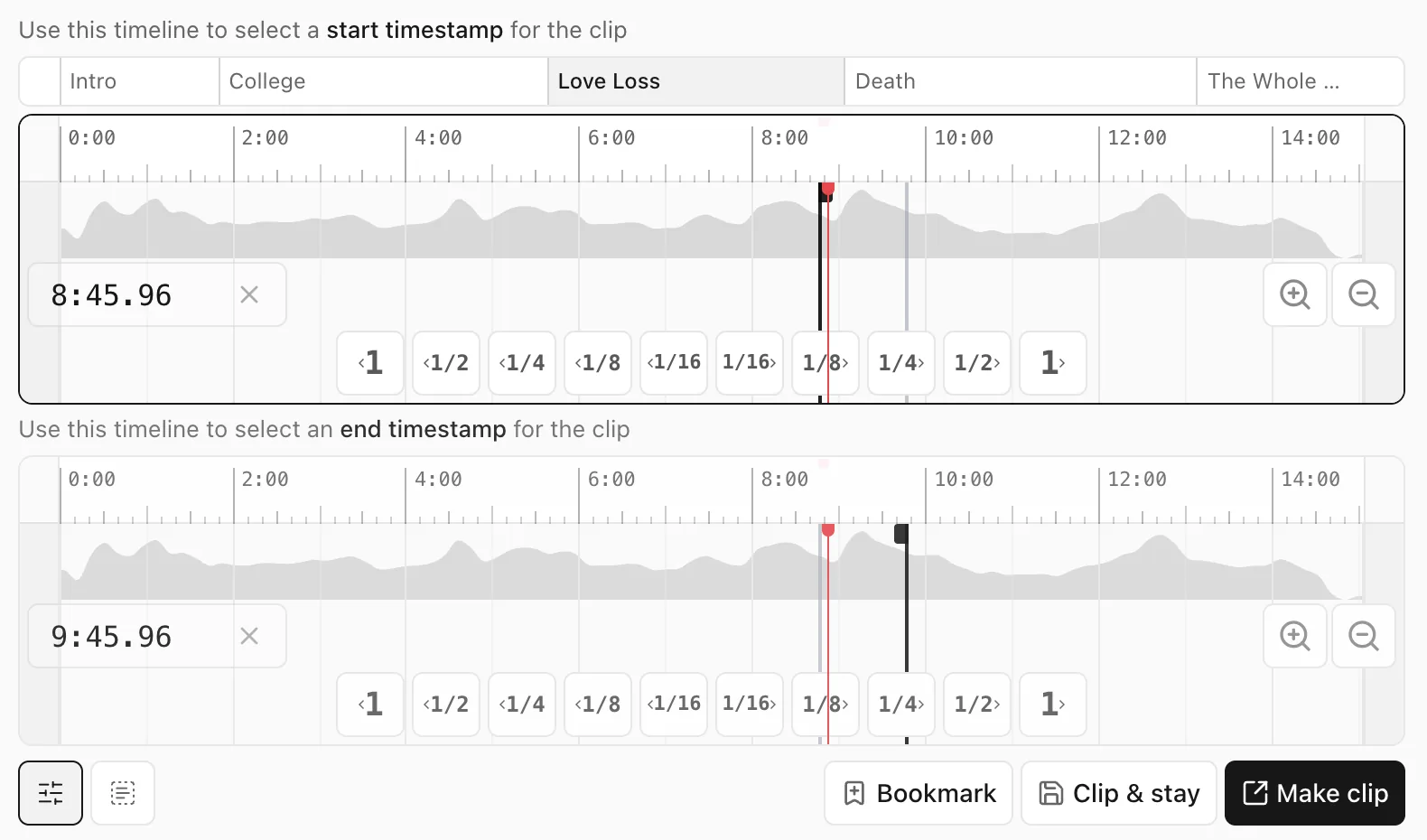
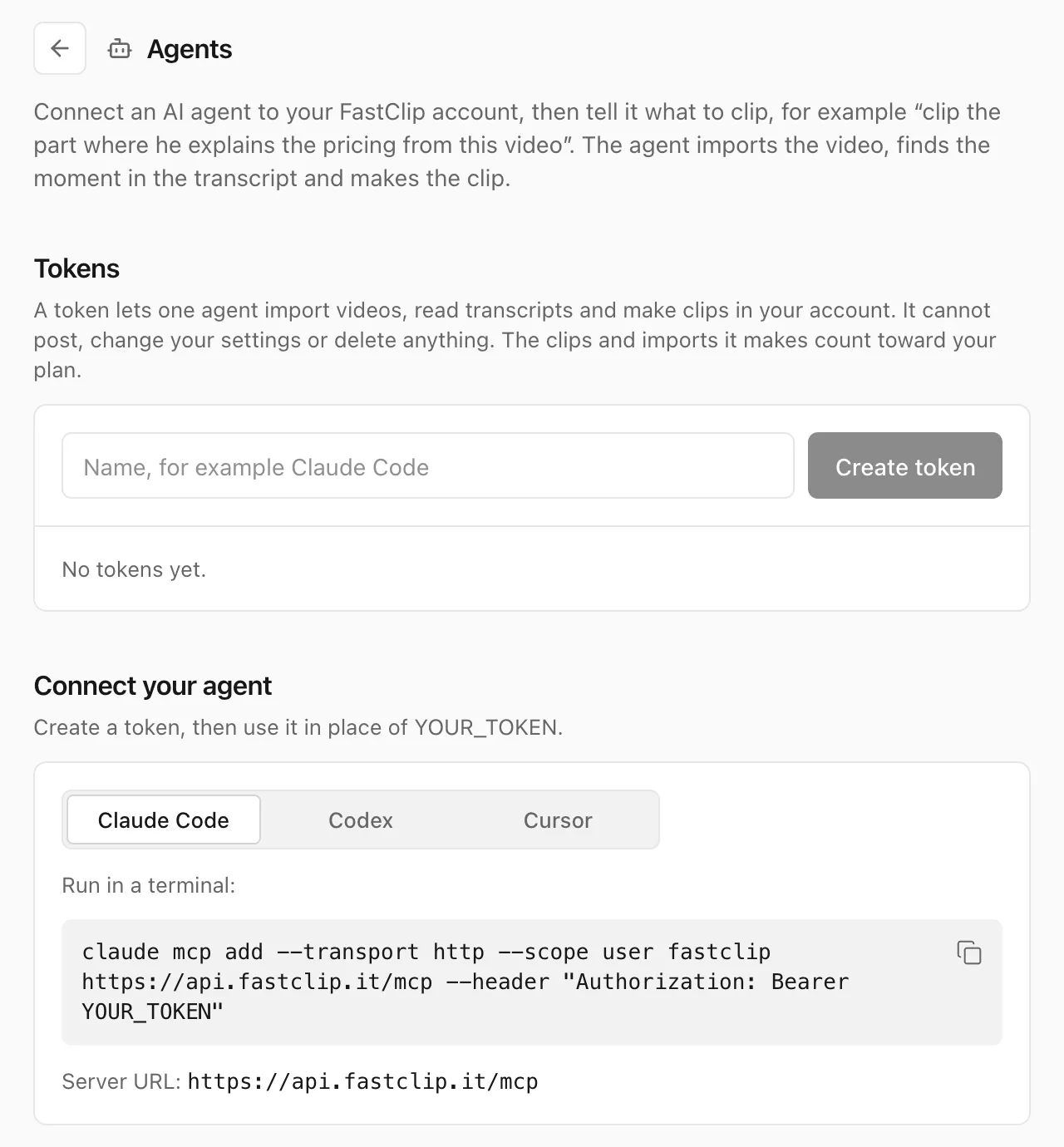
Screenshots of the FastClip web app, October 14, 2026.
3.Wavve, best for the lowest price billed monthly
Wavve has made audiograms since 2016. Its "Wavveforms" and progress bars turn audio into social video, and you can load long audio and clip from it; the longest video it renders is about 2 hours. It captions 59 languages with 3 caption styles, does not translate captions, and imports podcast RSS feeds.
There is no free plan, only a free trial that Wavve says allows full unlimited creation; it does not state the trial length. Starter costs $7.99 a month for 70 upload minutes and 18 exported videos a month, and Pro costs $19.99 a month for 210 minutes and 33 videos. Wavve says yearly billing saves 20% but shows no yearly price.
Wavve does not publish a count of waveform styles. It says it creates, schedules and posts on social media, but its pages name no networks, and its FAQ points to Zapier to post automatically to YouTube and other accounts. Calm Capital owned Wavve from 2021, and Disctopia, a podcast hosting company in Charlotte, North Carolina, bought it in May 2025.
Best suited for: Podcasters who want a simple audiogram tool at the lowest monthly price and can post the files themselves. Use the trial to check the styles before you pay.
4.Descript, best for audiograms inside a full editor
Descript adds audiograms as a layer in its text-based editor: a waveform in one of four styles (Lines, Circle, Ring or Wave) that animates with the audio and can follow one speaker only. You choose the part by selecting transcript text, add animated captions, and pick a layout from its audiogram templates. It transcribes 26 languages, all in the Latin alphabet.
The free plan gives 60 media minutes a month; its help center says free exports carry a Descript watermark and are limited to 720p, although its audiogram page calls the free plan watermark-free. Hobbyist costs $24 a month or $16 a month billed yearly for 10 media hours a month and watermark-free 1080p exports.
Descript has no RSS automation and publishes to YouTube and podcast hosts, not to Instagram or TikTok. It has no mobile app. Trustpilot shows 2.6 out of 5 from 290 reviews.
Best suited for: Producers who already edit the episode in Descript and want an audiogram from the same project. Too much tool for an occasional audiogram.
5.Castmagic, best for audiograms next to show notes and posts
Castmagic turns an audio-only recording into an audiogram, a waveform video with karaoke captions, in the same sizes as its video clips, next to transcripts, show notes and posts from the same episode. It imports files, YouTube links and RSS feeds, and transcribes more than 60 languages with translation. You choose the moment by highlighting the transcript.
There is no free plan, only a trial "to play with a few episodes" with no published terms, which we scored as a one-off trial. Hobby costs $29 a month or $19 a month billed yearly, with unlimited audiograms and, by Castmagic's own statement, no watermark on any plan.
Castmagic does not publish its waveform styles or the resolution of its exports, does not document audiograms made automatically from the feed, and does not post to social networks; you export the files or use Zapier.
Best suited for: Teams that want written content and audiograms from every episode and will pay from the first day. Not the tool to try for free.
6.VEED, best for free waveforms in an online video editor
VEED is an online video editor with an audiogram page: you add a sound wave from its waveform styles, the waveform animates with the audio, and auto subtitles highlight each word as it is spoken. Adding waveforms is free and unlimited, and VEED says its transcription covers more than 125 languages. You can trim to the exact second.
The free plan exports with a watermark in the corner, at 720p and at most 10 minutes. Creator costs $25 a month or $12.25 a month billed yearly, per user. VEED does not publish how many waveform styles it has, and its audiogram pages describe no RSS input or direct posting.
Trustpilot shows 4.2 out of 5 from 3,903 reviews, the most Trustpilot reviews of any tool on this page. VEED's waveform page claims that animations make a video 23% more likely to be watched to the end, with no source for the number.
Best suited for: People who edit other videos in VEED and want an occasional audiogram with animated captions. Pay for Creator to remove the watermark.
7.Recast Studio, best for audiograms plus direct posting on its top plan
Recast Studio turns audio clips into waveform videos with automatic captions you can edit, in vertical, square and horizontal sizes, and its page lets you pick colors, fonts and the waveform style. Its transcript editor lets you trim by deleting text. It transcribes more than 20 languages.
The free trial gives 60 credits once, 5 export minutes a month and at most 1 minute per export. Starter costs $17 a month or $14 a month billed yearly, with exports of up to 15 minutes; Professional allows 60-minute exports and is the only plan that posts directly to TikTok, Instagram, YouTube, Facebook, LinkedIn and X.
Recast Studio does not publish a waveform style count, documents no RSS automation, and its pricing page does not say whether the trial adds a watermark. Trustpilot shows 3.6 out of 5 from 86 reviews. Bit By Bit Labs in Indore, India, makes it.
Best suited for: Podcasters who want audiograms and posting in one place and will pay for the Professional plan. The free trial is too short to judge longer clips.
8.Kapwing, best for a quick waveform video in the browser
Kapwing's Sound Wave Generator turns an audio file into a video in its online editor, with six waveform styles from classic bars to stacked bars, dotted bars, radiating circles and bubbles, plus color, size and opacity controls. Kapwing's editor has a separate trim-by-transcript tool, but its waveform page does not say how you choose the moment; it does say you can share directly to social media.
Kapwing's waveform page says both that export requires a Pro account and that free exports carry a watermark; we scored the stricter statement. The free plan is otherwise limited to 720p, 4 minutes per export and 30 export minutes a month. Pro costs $24 a month or $16 a month billed yearly.
Kapwing translates subtitles into more than 100 languages but does not publish how many languages it transcribes. Trustpilot shows 1.9 out of 5 from 1,373 reviews, the lowest score on this page. Julia Enthoven and Eric Lu founded Kapwing in 2017.
Best suited for: People who already use Kapwing and need a waveform video now and then. Not a good fit on the free plan.
Side-by-Side Comparison
The same eight tools, by the facts that decide most purchases. Prices are per month in US dollars.
| Tool | Score | Free plan | Lowest price | Waveform styles | Caption languages | RSS automation | Works with AI agents (MCP) |
|---|---|---|---|---|---|---|---|
| Headliner | 11/14 | 1 watermark-free audiogram a month, ads | $7.99 billed yearly, $9.99 monthly | Not published | 100+ | Yes, posts every new episode | Not found on its pages |
| FastClip | 9/14 | 100 finished clips in total, no watermark | $0: nothing to buy | 23 | 35, detected automatically | No | Yes: sign-in (OAuth) or personal token; the agent cuts the exact start and end it chooses |
| Wavve | 8/14 | Trial only | $7.99 monthly | Not published | 59 | Imports the feed | Not found on its pages |
| Descript | 7/14 | 60 minutes a month, watermark, 720p | $16 billed yearly, $24 monthly | 4 | 26 | No | Yes: sign-in (OAuth) |
| Castmagic | 7/14 | Trial only, terms not published | $19 billed yearly, $29 monthly | Not published | 60+ | Imports the feed | Yes: sign-in (OAuth); reads transcripts and content, makes no clips |
| VEED | 6/14 | Watermark, 720p, 10 minutes | $12.25 billed yearly, $25 monthly | Not published | 125+ | No | Yes: sign-in (OAuth); makes avatar videos, not clips |
| Recast Studio | 6/14 | Trial: 5 export minutes a month, 1 minute each | $14 billed yearly, $17 monthly | Not published | 20+ | No | Not found on its pages |
| Kapwing | 4/14 | Export needs Pro (waveform page) | $16 billed yearly, $24 monthly | 6 | Not published | No | Yes: sign-in (OAuth); no clip or trim tool |
The last column is not scored. It says whether the vendor's own pages document an MCP server, the open standard that lets an AI agent such as Claude, ChatGPT, Cursor or Codex use the tool for you. We read each vendor's pages on October 14, 2026; the links are under Sources.
Which audiogram maker fits your use case
Start from how often you publish and who presses the button.
| If you are | Pick | Why |
|---|---|---|
| A weekly show that wants an audiogram of every episode | Headliner | RSS automations post each new episode for you |
| A podcaster who picks one moment and wants it free, without a watermark | FastClip | Exact cut, 23 waveform styles, nothing to buy |
| On a tight budget, paying month to month, and fine with posting by hand | Wavve | The lowest monthly-billed price here, 59 caption languages |
| An editor who already works in Descript | Descript | Waveform layer in the same project |
| Someone who wants animated word-by-word captions in an online editor | VEED | Free waveforms, captions in 125+ languages |
| A team that needs show notes and posts too | Castmagic | Audiograms and written content from one transcript |
What results look like
Measured numbers for FastClip from our own production records and tests, and the numbers the other vendors publish, labelled as their claims.
- FastClip, 30 days to October 14, 2026: 192 clips of all kinds finished by 83 people; the median clip was ready 15 seconds after Finish.
- FastClip audio upload (our test on production, October 5, 2026): an upload of two audio files, 30 seconds in all, was ready to clip 4 seconds after the upload finished, and a 12-second vertical 1080 × 1920 audiogram rendered in 35 seconds.
- Headliner (its claim): more than 1.5 million brands, podcasters and creators.
- Wavve (reported in 2021): more than US$1 million in annual recurring revenue in 2020.
- Castmagic (its claim): loved by more than 100,000 podcasters and creators.
Frequently asked questions
What is the best audiogram maker?
On our seven scored criteria, Headliner (11/14), then FastClip (9/14) and Wavve. Pick Headliner to automate every episode, FastClip for one exact moment free with no watermark, and Wavve for the lowest price billed monthly.
What is the best free audiogram maker without a watermark?
FastClip: its free plan has 100 finished clips in total with no watermark and no ads. Headliner gives 1 watermark-free audiogram a month on its free plan; Descript's help center, VEED and Kapwing say their free exports carry a watermark.
How do I make an audiogram from a podcast episode?
Upload the episode's audio, choose a moment of 30 to 90 seconds that makes sense on its own, let the tool transcribe it into captions, pick a waveform style and a vertical size, then export the MP4. The audiogram maker page shows the steps in FastClip.
How long should an audiogram be?
Most audiograms run 30 to 90 seconds, long enough for one complete thought. Instagram does not recommend Reels longer than three minutes to new audiences, so keep promotional clips well under that; the clip length guide has the numbers per network.
What is the difference between an audiogram and a video clip?
An audiogram shows a waveform, captions and artwork over audio; a video clip shows the people speaking. If your episode was filmed, a video clip usually holds attention better, and our podcast clip maker ranking covers those tools.
Can I make audiograms automatically for every episode?
Yes, with Headliner, which reads your RSS feed and makes and posts an audiogram for each new episode. Wavve and Castmagic import the feed but make no audiograms from it by themselves (Wavve only through Zapier), and FastClip has no feed automation.
Which audio files can I use?
Most tools take MP3 and WAV; Headliner's manual wizard takes MP3 or WAV up to 2 hours (4 on Pro). FastClip also takes M4A, M4B, AAC, FLAC, OGG, Opus, AIFF, WMA and ZIP archives of several files, but refuses files protected by DRM.
Try FastClip for free (no credit card required)
Upload the episode's audio.
Pick the exact moment by its words.
Choose one of 23 waveform styles.
Captions come in the language spoken.
Download a vertical MP4 with no watermark.
The free plan includes 100 finished clips.
Sources
Every number on this page comes from these pages, read on the date shown. Prices are in US dollars and change often; check the vendor's page before you buy.
- Headliner website, checked October 14, 2026
- Headliner pricing, checked October 14, 2026
- Headliner help center, checked October 14, 2026
- Headliner help center, checked October 14, 2026
- Headliner help center, checked October 14, 2026
- Headliner help center, checked October 14, 2026
- Headliner help center, checked October 14, 2026
- About Headliner, checked October 14, 2026
- Headliner on the App Store, checked October 14, 2026
- Headliner help center, checked October 14, 2026
- Headliner help center, checked October 14, 2026
- Headliner help center, checked October 14, 2026
- FastClip free plan (the limits in FastClip's code), checked October 14, 2026
- FastClip production records (read-only measurement), checked October 14, 2026
- Languages FastClip detects in speech (Deepgram, its transcription provider), checked October 14, 2026
- FastClip MCP documentation, checked October 14, 2026
- Wavve website, checked October 14, 2026
- Wavve pricing, checked October 14, 2026
- Wavve help center, checked October 14, 2026
- Wavve in the press, checked October 14, 2026
- Wavve in the press, checked October 14, 2026
- Wavve in the press, checked October 14, 2026
- Descript pricing, checked October 14, 2026
- Descript in the press, checked October 14, 2026
- Descript help center, checked October 14, 2026
- Descript help center, checked October 14, 2026
- Descript help center, checked October 14, 2026
- Descript case study, checked October 14, 2026
- Descript on Trustpilot, checked October 14, 2026
- Descript help center, checked October 14, 2026
- Descript help center, checked October 14, 2026
- Descript MCP documentation, checked October 14, 2026
- Castmagic website, checked October 14, 2026
- Castmagic pricing, checked October 14, 2026
- Castmagic help center, checked October 14, 2026
- Castmagic help center, checked October 14, 2026
- About Castmagic, checked October 14, 2026
- Castmagic help center, checked October 14, 2026
- Castmagic MCP documentation, checked October 14, 2026
- VEED pricing, checked October 14, 2026
- VEED help center, checked October 14, 2026
- VEED help center, checked October 14, 2026
- VEED help center, checked October 14, 2026
- VEED on Trustpilot, checked October 14, 2026
- VEED MCP documentation, checked October 14, 2026
- Recast Studio pricing, checked October 14, 2026
- Recast Studio help center, checked October 14, 2026
- Recast Studio on Trustpilot, checked October 14, 2026
- Kapwing pricing, checked October 14, 2026
- Kapwing help center, checked October 14, 2026
- Kapwing help center, checked October 14, 2026
- Kapwing in the press, checked October 14, 2026
- Kapwing on Trustpilot, checked October 14, 2026
- Kapwing MCP documentation, checked October 14, 2026
What changed on this page
- October 14, 2026: First published, with prices and limits checked on each vendor's pages.
- October 14, 2026: Added a column on whether each tool works with AI agents (MCP), from each vendor's own pages. It is not scored, so the ranking did not change.
We check every price and limit on this page again by December 13, 2026.
Free, no credit card
Try FastClip